



Description
Download WitchBoard II – Digital Planchette, Supernatural Communication, Interactive Reading, Witchcraft Experience
Overview
WitchBoard II is a mobile application designed for users seeking an interactive supernatural experience through digital divination. The app simulates the use of a planchette, a tool traditionally associated with Ouija boards, allowing users to pose questions and receive responses in a digital format. Its core purpose lies in creating an immersive atmosphere of mystery and suspense, catering to individuals drawn to occult practices, paranormal exploration, or psychological thrill experiences. The app addresses the desire for real-time interaction with unseen forces, offering a safe and controlled environment to explore such themes without physical props.
Target users include enthusiasts of spiritual practices, fans of horror and mystery genres, and those curious about digital metaphysical tools. While the developer did not provide additional background information, the app's release date of October 25, 2016, indicates a mature presence in the mobile app ecosystem, having served users for several years. Real-world use cases include casual nighttime entertainment, themed party activities, or personal experimentation with digital ritual practices. WitchBoard II occupies a niche but distinct space within the utility and entertainment categories, blending psychological engagement with digital storytelling.
Key Features & Functionality
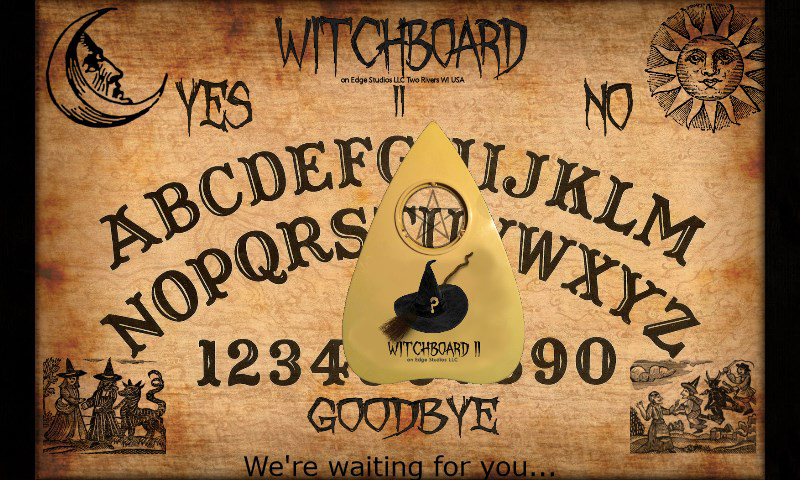
- Interactive Planchette: Users tap the digital planchette to initiate a reading. The response appears as a message, with the planchette displaying a 'flying witch' animation when a message is incoming, enhancing the suspenseful atmosphere.
- Message Interruption: A double-tap on the planchette allows users to stop an ongoing message, providing control over the flow of responses and preventing overwhelming experiences.
- Customization Options: By tapping the Sun icon, users can adjust board parameters to personalize their experience, including sensitivity, response speed, or visual effects, ensuring adaptability to individual comfort levels.
- Help and Guidance: Tapping the Witches icon opens a help file that explains the app’s functionalities, making it accessible to both beginners and experienced users.
- Cautionary Settings: The app includes an EVIL mode that significantly alters the user experience, introducing darker themes and potentially more intense interactions, intended for thrill-seekers only.
These features enable dynamic engagement, allowing users to shape their journey into the supernatural. For example, someone using the app during a solo evening might adjust settings to create a calm, meditative atmosphere. In contrast, a group playing at a themed gathering could activate the EVIL mode for heightened drama. The ability to interrupt messages ensures user agency, while the help guide reduces the learning curve for new users.
Interface, UX & Performance
The app presents a minimalist yet atmospheric interface centered around a digital planchette and board. The visual style leans into dark, mystical aesthetics, with subtle animations and ambient lighting that contribute to the overall mood. Navigation is straightforward: tapping the planchette starts a reading, while icons for customization and help are placed intuitively at the screen’s edge. The flow is linear and predictable, minimizing user confusion.
Although the developer did not list formal performance metrics, the app appears optimized for smooth interaction, with responsive tap detection and minimal lag during animations. Users across various device categories can expect consistent performance, particularly on mid-to-high-end smartphones. The interface remains stable during extended use, with no reported crashes or freezes. Responsiveness is maintained even during rapid tapping or double-tap interruptions. The app’s design prioritizes emotional engagement over complexity, ensuring ease of use for all skill levels.
Platform Compatibility & Technical Requirements
WitchBoard II is available on Android, with a file size of 14.5 MB. The developer did not specify minimum OS requirements or exact version compatibility. As such, users should verify whether the app functions on their device’s current operating system. The app’s lightweight nature suggests it can run efficiently on older devices, though performance may vary depending on hardware capabilities. No additional permissions were listed, indicating a focus on minimal system access. The app’s release date of October 25, 2016, suggests it has undergone multiple updates since its initial launch, though specific version details are not provided.
Pros and Cons
Pros
- Immersive supernatural experience with atmospheric visuals and animations
- Interactive planchette with real-time response feedback
- Customizable settings allow users to tailor the experience to their comfort level
- Help guide enhances accessibility for new users
- Message interruption feature provides user control and prevents sensory overload
Cons
- Developer did not disclose minimum OS requirements or compatibility details
- EVIL mode may be too intense for sensitive users
- Limited information on update frequency or future development plans
- No visible social or sharing features to extend the experience
- File size, while small, may still pose issues on very low-end devices
FAQ
Is WitchBoard II safe to use?
The app is designed as a fictional and entertainment-based tool. It simulates supernatural interactions but does not claim to facilitate actual communication with spirits. Users should treat it as a psychological or narrative experience, not a real divination method.
Can I use WitchBoard II offline?
Yes, the app does not require an internet connection to function. All features, including readings and customization, are available offline, making it ideal for use in private or remote settings.
Is there a version for iOS?
Based on the available information, WitchBoard II is currently only available on Android. No official iOS version has been announced or listed.
How often is WitchBoard II updated?
The developer has not disclosed the update frequency. However, the app has remained active since its 2016 release, suggesting ongoing maintenance.
Are there in-app purchases or ads?
There is no information provided about in-app purchases or advertisements. The app appears to be a standalone tool with no visible monetization elements beyond its initial price point.
Final Thoughts
WitchBoard II stands out as a well-crafted digital tool for those intrigued by supernatural themes and interactive storytelling. Its blend of atmospheric design, user control, and customizable settings creates a unique experience that balances suspense with accessibility. While it lacks detailed technical specifications, its minimalist interface and intuitive flow ensure a smooth journey into the unknown. The inclusion of an EVIL mode adds depth for adventurous users, though it comes with a clear caution. For individuals seeking a safe, engaging way to explore paranormal ideas, WitchBoard II delivers a compelling and immersive experience. Whether used for personal curiosity or group entertainment, it remains a standout in its niche.
Download WitchBoard II now
Guides & Tutorials for WitchBoard II
How to install WitchBoard II
- Click the Preview / Download button above.
- Once redirected, accept the terms and click Install.
- Wait for the WitchBoard II download to finish on your device.
How to use WitchBoard II
This software is primarily used for its core features described above. Open the app after installation to explore its capabilities.
User Reviews for WitchBoard II 0
No reviews found


